
Quynh Ngoc Pham
Content Manager
ERP For Small Business: Top 5 Systems To Consider
5 minutes read
Audio description available
Updated on May 22, 2026
Every small business starts with a vision and simple operations management tools. Initially, tools like Excel might suffice for tracking sales, inventory, and finances. However, as your business grows, so does the complexity of managing its various functions. You might reach a point where data starts to silo, processes become inefficient, and growth plateaus because your tools no longer communicate effectively with each other. This stagnation signals the need for a more robust solution. This is where an Enterprise Resource Planning (ERP) system comes into play. An ERP for small businesses transforms disjointed operations into a streamlined, interconnected workflow that paves the way for sustainable growth and scalability.
What Is ERP For Small Business?
Enterprise Resource Planning (ERP) software streamlines company operations by integrating transactional data from multiple sources. This efficient tool manages essential processes such as accounting, human resources, sales, marketing, and data security.
ERP for small businesses integrates core processes like finance, inventory, and customer relations into one system. Custom ERP software tailors these functionalities to meet the specific needs of small enterprises, enhancing efficiency and enabling better data management. This centralized approach supports streamlined operations and informed decision-making.
In 1992, IBM engineers developed the 1st ERP software for small businesses to automate and refine workflows. Since then, the ERP industry has presented a competitive market with a wide selection of platforms.
In small business management, are game-changers. They maintain data integrity through a single source of truth and consolidate operations into one manageable dashboard.Key Factors To Consider When Selecting An ERP System
Choosing the right ERP platform requires a deep evaluation of technical capability, financial constraints, and long-term business alignment.
Cost-Effectiveness
For growing small businesses, cash flow visibility is paramount. The ideal ERP solution must offer a highly transparent total cost of ownership (TCO) without hidden implementation fees, heavy upfront infrastructure investments, or unexpected maintenance charges. Small businesses should prioritize cloud-based SaaS (Software as a Service) models that provide affordable subscription plans (per-user or per-module basis) to ensure a predictable and high Return on Investment (ROI).
Scalability
A small business today will not look the same tomorrow. The selected ERP architecture must be highly scalable—capable of handling exponential increases in data volume, accommodating expanding user bases, supporting multi-currency transactions, and activating advanced operational modules without requiring a complete system overhaul or disrupting active daily operations.
Integrality
An effective ERP must possess strong integrative capabilities. It should serve as a unified platform that centralizes diverse functionalities. Furthermore, the system must offer robust API capabilities to effortlessly integrate with pre-existing third-party applications, payment gateways, and e-commerce platforms, preventing the re-emergence of isolated data silos.
Usability
An ERP system should be intuitive and easy to use for employees across all departments, regardless of their technical expertise. A user-friendly interface, simplified navigation, and customizable dashboards can significantly reduce onboarding time and training costs. Small businesses should prioritize ERP platforms that provide seamless workflows, real-time reporting, and role-based access to improve employee productivity, minimize operational errors, and accelerate user adoption throughout the organization.
Mobility
In today’s fast-paced digital environment, business operations are no longer confined to the office. A modern ERP solution must support high mobility by enabling secure access from mobile devices, tablets, and remote work environments. Mobile ERP functionality empowers managers and employees to monitor inventory, approve transactions, track sales performance, and access critical business data anytime and anywhere. This flexibility enhances operational responsiveness, improves decision-making speed, and supports hybrid or distributed workforce models effectively.
Read more: How much does it cost to build an ERP system?
Top 5 ERP Systems For Small Business
Odoo ERP For Small Business
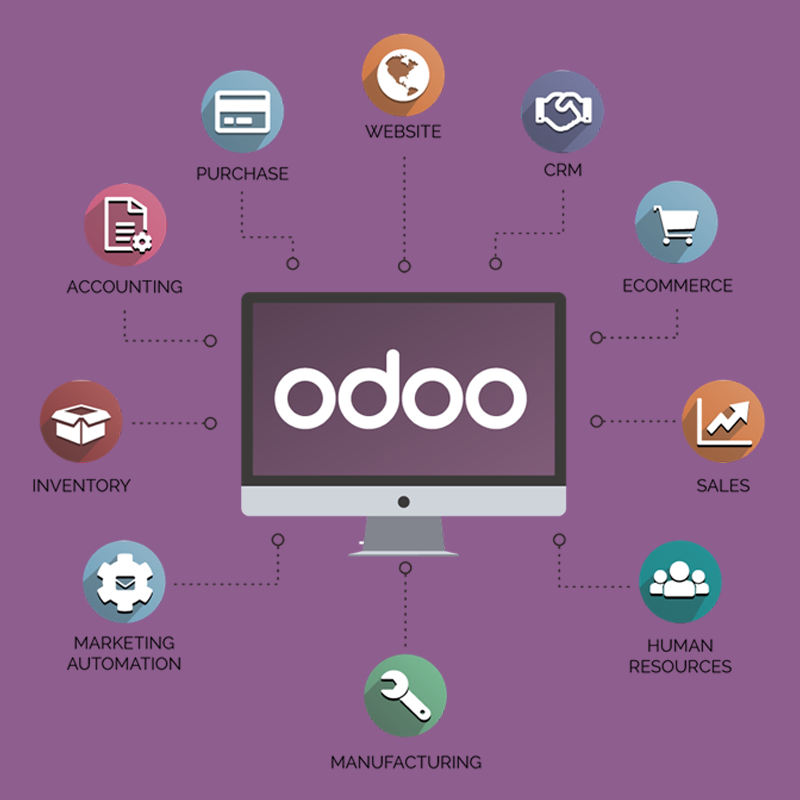
Known for its modular design, Odoo is now one of the most popular ERP systems for small businesses, with many Odoo customization solutions providers. It allows businesses to start with the basics and expand as needed by adding more apps. Its affordability and ease of customization make it a popular choice among startups and small enterprises.
Odoo supports various business processes, including accounting, inventory management, project management, and e-commerce, all within a user-friendly interface and accessible via mobile devices.
Key Features
- Sales Quote Templates: Effortlessly create polished quotes in minutes with our user-friendly sales templates. Offer your customers transparent pricing and seamless purchasing options directly from your quotes.
- Procurement Automation Software: Automate your procurement processes with our advanced software. Easily track purchase orders, manage supplier invoices, and organize supplier data to enhance procurement efficiency.
- Real-Time Project Management Tools: Boost collaboration with our real-time project management tools that integrate directly into your sales funnel. Experience enhanced project visibility with instant access to visual data analytics.
- E-commerce Platform Solutions: Expand your online store with our robust e-commerce platform, featuring an extensive product catalog and detailed content descriptions to attract and engage shoppers.
- Inventory Management Systems: Streamline your inventory management with our sophisticated system designed to reduce processing times, minimize stock levels, and automate transaction processes for better inventory control and cost savings.
Pros
- Highly customizable with a large community of developers.
- Cost-effective for small businesses due to its open-source nature.
- Strong integration capabilities.
Cons
- Can be complex to implement without technical expertise.
- Customizations can lead to complications during upgrades.
Cost
Basic apps are free, but costs can increase with additional modules and customization.
Looking for skilled Odoo developers with years of experience to help with your project?
Hire our Odoo expertsNetSuite ERP For Small Business
Oracle's NetSuite is another strong ERP system for small businesses, offering extensive features emphasizing scalability and integrality. It supports many industries and is ideal for small businesses looking to scale quickly.
Key Features
- Customer Relationship Management (CRM): Integrates CRM to manage customer interactions, sales forecasting, and lead management within the ERP system for a unified customer view.
- E-Commerce: SuiteCommerce enables seamless integration of online sales with inventory, order management, and back-office systems to support both B2B and B2C transactions.
- Order and Inventory Management: Automates order processing and optimizes inventory with features for demand planning, inventory control, and warehouse management.
- Supply Chain Management: Provides real-time visibility and planning tools for efficient supply chain operations, including supply chain control towers and production management.
- Human Resources: SuitePeople integrates HR processes within the ERP for managing payroll, benefits, performance management, and employee engagement.
Pros: Unmatched scalability that easily handles rapid business growth up to enterprise-level operations; robust out-of-the-box analytical insights.
Cons: High initial licensing and implementation costs; steeper learning curve for non-technical or smaller teams.
Cost: Typically starts at around $999 per month with additional costs per user, which can be about $99 per user per month.
Learn more: SaaS app development services for startups
SAP Business One ERP For Small Business
Designed for small and medium-sized enterprises, SAP Business One is a single solution that manages every aspect of a business, from sales and customer relationships to financials and operations.
Key Features
- Comprehensive Business Management: Integrates all core business functions, including accounting, sales, purchasing, and customer interactions, for improved operational efficiency.
- Financial Management: Automates financial operations like ledger management, tax calculations, and supports multicurrency transactions.
Provides robust financial reporting and budgeting tools to ensure compliance and informed decision-making.
- Customer Relationship Management (CRM): Enhances customer service through streamlined sales processes and opportunity management, boosting customer satisfaction and sales efficiency.
- Purchasing and Inventory Control: Manages the entire order-to-pay cycle and optimizes inventory with detailed tracking, pricing, and warehouse management.
- Production Planning: Supports detailed production planning with tools for managing production orders, bills of materials, and material requirements planning.
- Analytics and Reporting: Delivers real-time insights and customizable reporting capabilities via integrated SAP HANA analytics to support quick, data-driven decisions.
- Integration Capabilities: Offers extensive API support for seamless integration with various third-party applications, enhancing functionality and user preference compatibility.
Pros: Exceptionally powerful material requirements planning (MRP) and inventory tracking tools; highly dependable security infrastructure backed by global tech leader SAP.
Cons: Higher infrastructure/hosting investment compared to basic SaaS solutions; software customization requires specialized SAP partner expertise.
Cost: Costs can vary widely but typically start around $3,213 for a one-time software license, plus costs for implementation and ongoing support.
Reaad more: ERP development process
Microsoft Dynamic 365 ERP For Small Business
A suite of ERP and CRM applications, Microsoft Dynamics 365 is designed to provide comprehensive business management features for small to large businesses.
Key Features
- Unified Operations: Integrates CRM and ERP capabilities into one solution, streamlining business processes across finance, sales, service, and supply chain.
- Scalability: Offers modular applications that are independently deployable and scalable, allowing businesses to adapt as their needs evolve.
- Advanced Analytics: Seamlessly integrates with Power BI for interactive dashboards and real-time data insights.
- AI-Driven Insights: Includes built-in AI tools for predictive insights that optimize sales trends, customer service, and inventory management.
- Customer Data Platform: Aggregates data from various sources to provide a comprehensive view of customers, enhancing personalization and lead management.
- Customization and Integration: Supports extensive customization and integrates smoothly with other Microsoft products and third-party services.
Pros: Highly intuitive interface requiring minimal user onboarding; exceptional data portability to and from Microsoft Excel for financial analysis.
Cons: Requires a structured, partner-led implementation phase; subscription costs can add up quickly as you add specialized user licenses.
Cost: The cost starts at $190 per user per month for the full suite, with smaller bundles and individual apps available at lower costs.
QuickBooks Enterprise ERP For Small Business
An extension of QuickBooks, QuickBooks Enterprise is a system ERP for small businesses that provides additional features to manage a wider range of business operations.
Key Features
- Advanced Inventory Management: Track inventory precisely with serial and lot tracking, multi-location management, and integrated barcode scanning.
- Enhanced Reporting Capabilities: Access customizable financial reports, tailored industry metrics, and comprehensive consolidated data from multiple QuickBooks files.
- User Role Customization and Permissions: Easily set up with predefined user roles and fine-tune data access with customizable permissions.
- Advanced Pricing: Implement flexible pricing rules and conditional promotions automatically based on predefined criteria.
- Payroll Processing: Manage payroll and tax deductions seamlessly with integrated processing and direct deposit options.
Pros
- Easy to use for those familiar with QuickBooks.
- Good integration with banking and detailed financial management.
- Reasonably priced for small businesses.
Cons
- Limited customization compared to more comprehensive ERP systems.
- Primarily suited for businesses focused on financial and inventory management.
Cost: Starts at about $1,213 per year for a single user, with higher tiers offering more features and user access.
How To Choose The Right ERP System For Your Business
Choosing the right ERP system is essential for improving operational efficiency and supporting long-term business growth. To maximize ROI, businesses should evaluate ERP solutions based on the following factors:
Industry Alignment
Choose an ERP platform designed for your industry. Industry-specific solutions often include built-in workflows, compliance support, and features tailored to your operational needs, reducing implementation complexity and customization costs.
Business Goals & Process Mapping
Clearly identify your business challenges, workflows, and growth objectives before selecting an ERP. This helps ensure the system supports automation, improves efficiency, and integrates smoothly with existing operations.
Customizability & Scalability
A flexible ERP system should adapt as your business grows. Modular platforms such as Odoo allow businesses to customize workflows, add features, and scale operations without major system changes.
User Experience (UX) & Mobility
An intuitive interface helps employees adopt the system faster and reduces training time. Mobile accessibility is also important, allowing teams to access real-time business data and approvals from anywhere.
Integration Capability
The ERP system should integrate easily with CRM tools, accounting software, eCommerce platforms, and third-party applications to eliminate data silos and improve operational visibility.
Vendor Support & Training
Reliable technical support, onboarding assistance, and employee training are critical for successful ERP implementation and long-term system stability.
Hands-On Demos & Proof of Concept (PoC)
Before making a final decision, request a demo or trial environment using sample business data. A Proof of Concept (PoC) helps evaluate usability, performance, and workflow compatibility in real business scenarios.
Conclusion
At BHSoft, we specialize in bridging the gap between standard ERP systems and your unique operational realities. Our team of expert developers and consultants excels in providing custom software development services and end-to-end Odoo customization solutions. We work hand-in-hand with your stakeholders to analyze operational bottlenecks, engineer tailored ERP modules, automate workflows, and deploy highly integrated digital solutions that maximize efficiency and secure your long-term business growth.
Ready to modernize your business operations with a custom ERP solution? Contact the BHSoft team today to explore your digital transformation journey!